
Archive: Dev Blog

Colonies and Endgame

Hi Guys,

We’ve been asked a lot recently about the plans for end game and colonisation. It’s been a while since we posted about future plans so I thought it’d be nice to share some basics on the colonisation feature coming to Starbound before 1.0. We’re working on this actively now, and whilst it won’t be in the next (combat) update. We do want to get the basics in in the not too distant future.

As always, everything mentioned here could change, see additions or subtractions.

We’ve been gearing up for colonisation for a while now; we’ve recently added a teleporter network feature to allow you to jump between locations quickly, even if they’re galaxies away. We’ve been giving objects new properties and ensuring they’re priced appropriately and we’ve been massively improving the NPC pathing and behaviour systems internally. All of these features are key to the colonisation system.

Object properties

To enable the colonisation system to function we’ve begun tagging objects with special properties. For example, an Apex mutant pod might have the following tags.

exampletags

All of these tags, coupled with the size of the object allow us to figure out how a house is decorated and what kind of person might move in. Different NPCs will only move in if enough of a house is decorated with objects and blocks that match their interests.

Houses also have some basic requirements, like light, walls and doors. Here are a couple of examples of houses and who will move into them.

Apexscientist Glitchsoldier


Whilst the type of NPC that moves in is based on the type of furniture used, the visual appearance of that NPC is based on the exact layout of the furniture within the house. So you’re able to put your feng shui skills to the test to attract someone in particular.

Once NPCs move in they’ll offer all sorts of different benefits. Some NPCs will sell unique items, some will defend the town, some will offer quests and others will place new unique objects in their home like new crafting tables or facilities. Sometimes you’ll only be able to attract an NPC using items a previous NPC has given you, allowing for colony progression. Sometimes you’ll need objects from a unique dungeon or sub biome to attract particularly rare NPCs. For example, obtaining all the blueprints for slime furniture from the slime biome, crafting it and using it to decorate a house will cause a slime creature to move into your colony and in turn sell you a unique weapon.

slimeenthusiast

Later we plan to expand on this system with enemies attacking your colony, inter-NPC interactions and various other complexities. But this initial implementation will tie together much of the exploring, questing and adventuring in the game and serves as a key part of Starbound’s end game. We may even tie the system to planet and biome type, so setting up on certain planets is the only way to attract some of the rarer NPCs.

This won’t be the only end game feature, we’re looking into randomly generated repeatable missions, farming and procedurally generated quests. As well as the final stars enabling high level versions of all the existing biomes.

We’d love to hear your feedback on this system!
April 23rd – How to retrieve your home planet!

Hello!

As you may have read in our patch notes, the newest stable update saw the ‘home planet’ feature replaced by planet bookmarks and direct teleporters. This meant that existing characters would lose track of their home planets, as they’d no longer have the ‘home’ marker.

But never fear! Ideally you’d have written down your planet’s coordinates, but either way your home planet still exists and is intact and you can find it using the following method. :)

Elite Space Hobo from our community beat us to posting a guide, which you can find here.

homeplanet_tutorial

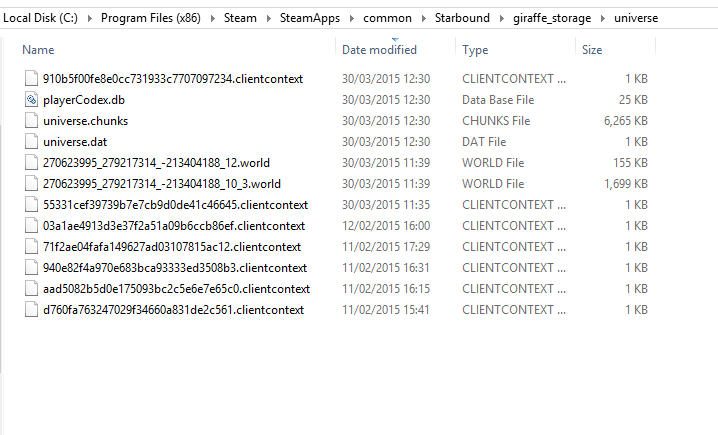
  • Find your universe folder. Typically, it should be located in SteamLibrary\SteamApps\common\Starbound\giraffe_storage\universe.

Screenshot 2015-04-23 11.24.57

  • Right click -> sort files by date last modified. If your planet’s been heavily customized/built upon, it should be one of the larger files. If you visit it frequently, it should also be one of the most recent.
  • “What do all these numbers mean?!” World files with names like: 270623995_279217314_-213404188_12.world mean that you’ve visited a planet with the coordinates X -270623995 Y -279217314.

coordinates_hooray

  • Put the coordinates into your ship’s computer and… hopefully, voila! Planet located! If not, try some of the other planets in your universe folder.
  • Now that you’ve found your home planet, don’t forget to create a bookmark. :)

I hope this proves helpful! We’ll be posting our daily progress update later, as usual. See you then! <3

April 21st – [STABLE] Update Notes

Afternoon everyone!

We’re happy to say we are releasing a new Stable Update today! Nearly every change has already been covered in a previous blog post from Metadept, with the stable update also including even more bug fixes, plus huge server stability updates!


Before I get to the actual patch notes, please read this big red warning text:

As of this patch, the ‘Home’ planet feature has been replaced by planet bookmarks and direct teleporters. EXISTING CHARACTERS WILL LOSE THEIR HOME PLANETS! Make sure to write down your home planet’s coordinates or leave your ship in orbit so that you don’t lose track of its location.

Now, on to the good stuff!


betterbookmarksnewfeature_planetbookmarks

  • Players can now save planet locations in the cockpit navigation interface
  • Select a planet, then select ‘Add Bookmark’ to bookmark it
  • Select a bookmarked planet from the list to set it as your navigation target

alltheteleportersnewfeature_teleporters

  • Players can now place and register teleporters on planets
  • Interact with a teleporter to add it to your list of registered destinations, which you can return to from any other teleporter
  • Can also be used to teleport directly to party members
  • Find Teleporter Cores in the world
  • New Outpost store, the 2-Stop Teleshop, lets you use a Teleporter Core to create various types of teleporters to suit your style
  • Breaking a teleporter destroys it, but refunds the Teleporter Core
  • Outpost store includes a teleporter you can register for easy access to the outpost

changesreturningtoworlds

  • After logging out, players will be returned to the place in the world where they left (rather than back on the ship)
  • Mission dungeons will persist for 10 minutes after all players have left, allowing continuation of a mission after dying
  • Mission dungeons now have teleporters at the entrance and exit, should help clarify how and when to leave
  • Players can no longer be attacked while teleporting
  • Players can no longer initiate another teleport while teleporting
  • Teleport cinematic while destination world is loading

pig

shippets

  • All player ships should now be inhabited by a non-combat pet corresponding to the character’s race, in one of a wide variety of color options
  • Pets will investigate held items and various ship objects
  • Pets can be fed and will develop preferences for certain foods
  • Terramart now sells several pet-related items
    • Food Bowl to keep your pet fed while you’re busy adventuring
    • Pet Ball for your pets to play with
    • Pet House for your pets to sleep in adorably

thearknewlocation_ark

  • Ancient Gates now have another destination, a huge and ancient ruin
  • Gives a few clues about Starbound’s overarching plot… so mysterious!

changes_pathfinding

  • NPCs and ground monsters now jump accurately and reliably find paths across complex terrain
  • NPCs and ground monsters are much better at avoiding and escaping liquids
  • NPCs and ground monsters should become stuck MUCH less often


Screenshot 2015-04-21 13.53.03

newbiome_slimecaves

  • Can be found underground on Radioactive worlds
  • Includes various unique items and a new furniture set

miscellaneous

  • Reworked Apex, Avian, Floran, Glitch and Hylotl name generators to be much less (but still a little bit) silly.
  • Changes to melee weapon responsiveness, damage sounds and visual feedback. Lots more of this coming in a future update!
  • Ranged weapons now have varying accuracy depending on the weapon type, quality and rate of fire
  • Player energy now refills much more rapidly and has a shorter delay before regenerating
  • Various improvements to server architecture which should greatly improve server performance and stability
  • Various improvements to internal handling of Lua API calls which should greatly reduce CPU usage, particularly in areas with many monsters or NPCs
  • Many small improvements and fixes to objects throughout the game, including updating 3d printing costs in preparation for future additions to the game’s economy
  • Scroll bars can now be clicked and dragged properly
  • Fixed several bugs with codexes. Codexes are now retained across universes. Existing players will, unfortunately, have their codexes reset.
  • Moons are now generated with solid cores to help avoid falling out the bottom
  • Several improvements to grass placement, also add underground ceiling grasses to several biomes
  • Fix bug where music volume changed in combat
  • Several small improvements to AI interface
  • Removed the annoying levitation status from random status pods
  • Added extra functionality to the “test” Json Patch operation (supports “inverse” tests and existence test through omitting “value”).
  • Added optimizations and cyrillic character fixes for Hobo font. Thanks to user dsp2003 for this fix!


Existing characters and universes are safe (aside from the codexes and home planet, as listed above). However, a few of these changes may require a new universe or new planets to take effect. Hope you all enjoy the changes, and for those of you playing on the Unstable branch, let us know if you find any bugs or have other feedback!