
Archive: Media

Colonies and Endgame

Hi Guys,

We’ve been asked a lot recently about the plans for end game and colonisation. It’s been a while since we posted about future plans so I thought it’d be nice to share some basics on the colonisation feature coming to Starbound before 1.0. We’re working on this actively now, and whilst it won’t be in the next (combat) update. We do want to get the basics in in the not too distant future.

As always, everything mentioned here could change, see additions or subtractions.

We’ve been gearing up for colonisation for a while now; we’ve recently added a teleporter network feature to allow you to jump between locations quickly, even if they’re galaxies away. We’ve been giving objects new properties and ensuring they’re priced appropriately and we’ve been massively improving the NPC pathing and behaviour systems internally. All of these features are key to the colonisation system.

Object properties

To enable the colonisation system to function we’ve begun tagging objects with special properties. For example, an Apex mutant pod might have the following tags.

exampletags

All of these tags, coupled with the size of the object allow us to figure out how a house is decorated and what kind of person might move in. Different NPCs will only move in if enough of a house is decorated with objects and blocks that match their interests.

Houses also have some basic requirements, like light, walls and doors. Here are a couple of examples of houses and who will move into them.

Apexscientist Glitchsoldier


Whilst the type of NPC that moves in is based on the type of furniture used, the visual appearance of that NPC is based on the exact layout of the furniture within the house. So you’re able to put your feng shui skills to the test to attract someone in particular.

Once NPCs move in they’ll offer all sorts of different benefits. Some NPCs will sell unique items, some will defend the town, some will offer quests and others will place new unique objects in their home like new crafting tables or facilities. Sometimes you’ll only be able to attract an NPC using items a previous NPC has given you, allowing for colony progression. Sometimes you’ll need objects from a unique dungeon or sub biome to attract particularly rare NPCs. For example, obtaining all the blueprints for slime furniture from the slime biome, crafting it and using it to decorate a house will cause a slime creature to move into your colony and in turn sell you a unique weapon.

slimeenthusiast

Later we plan to expand on this system with enemies attacking your colony, inter-NPC interactions and various other complexities. But this initial implementation will tie together much of the exploring, questing and adventuring in the game and serves as a key part of Starbound’s end game. We may even tie the system to planet and biome type, so setting up on certain planets is the only way to attract some of the rarer NPCs.

This won’t be the only end game feature, we’re looking into randomly generated repeatable missions, farming and procedurally generated quests. As well as the final stars enabling high level versions of all the existing biomes.

We’d love to hear your feedback on this system!

Hey there, everyone! We’ve been reading your feedback from last week’s stable update, and it seems like most people are really enjoying the new features. We’ve also seen reports of several minor bugs, so we’ve pushed out a new update which should address most of these. Thanks to everyone who’s given us specific and detailed bug reports; it’s a huge help!

Fixes in this update:

  • Fixed a bug causing clients to be stuck in teleport cinematic if they disconnected from a server while it was playing
  • Fixed a bug that could prevent players’ ships from loading after a failed warp
  • Fixed missing outpost quest NPC, the arcade game quest is now completable again
  • Fixed a bug causing ship doors to be removed on upgrades
  • Fixed a bug locking players out of the end of the Erchius Mining Facility mission if they died after defeating the boss
  • Fixed a bug preventing the lever puzzle in the Floran Party mission from being completed
  • Fixed damage areas on ceiling and floor spikes
  • Fixed custom signs being set to ‘on’ after saving and loading
  • Fixed a bug causing the game to crash when entering a bad host name in the server join dialog
  • Fixed a rare bug in world generation which could prevent terrain from generating
  • Increased NPC energy regen
  • Greatly reduced server->client bandwidth for updating player ships
  • Made additional changes to further improve server stability
  • Included dump_versioned_json and make_versioned_json utilities for reading and writing various save data formats
  • Added a /suicide command for characters who are irreversibly stuck

Hopefully these fixes will be helpful to those of you experiencing issues. Let us know in the comments if you find anything new. Enjoy!

April 23rd – How to retrieve your home planet!

Hello!

As you may have read in our patch notes, the newest stable update saw the ‘home planet’ feature replaced by planet bookmarks and direct teleporters. This meant that existing characters would lose track of their home planets, as they’d no longer have the ‘home’ marker.

But never fear! Ideally you’d have written down your planet’s coordinates, but either way your home planet still exists and is intact and you can find it using the following method. :)

Elite Space Hobo from our community beat us to posting a guide, which you can find here.

homeplanet_tutorial

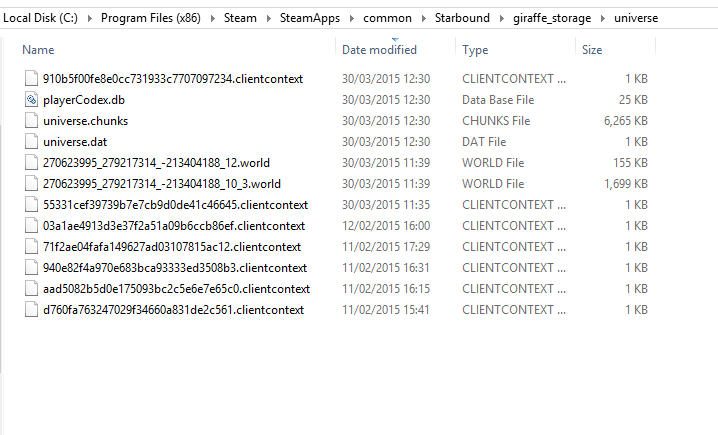
  • Find your universe folder. Typically, it should be located in SteamLibrary\SteamApps\common\Starbound\giraffe_storage\universe.

Screenshot 2015-04-23 11.24.57

  • Right click -> sort files by date last modified. If your planet’s been heavily customized/built upon, it should be one of the larger files. If you visit it frequently, it should also be one of the most recent.
  • “What do all these numbers mean?!” World files with names like: 270623995_279217314_-213404188_12.world mean that you’ve visited a planet with the coordinates X -270623995 Y -279217314.

coordinates_hooray

  • Put the coordinates into your ship’s computer and… hopefully, voila! Planet located! If not, try some of the other planets in your universe folder.
  • Now that you’ve found your home planet, don’t forget to create a bookmark. :)

I hope this proves helpful! We’ll be posting our daily progress update later, as usual. See you then! <3