
Hey there, everyone! We’ve been reading your feedback from last week’s stable update, and it seems like most people are really enjoying the new features. We’ve also seen reports of several minor bugs, so we’ve pushed out a new update which should address most of these. Thanks to everyone who’s given us specific and detailed bug reports; it’s a huge help!

Fixes in this update:

  • Fixed a bug causing clients to be stuck in teleport cinematic if they disconnected from a server while it was playing
  • Fixed a bug that could prevent players’ ships from loading after a failed warp
  • Fixed missing outpost quest NPC, the arcade game quest is now completable again
  • Fixed a bug causing ship doors to be removed on upgrades
  • Fixed a bug locking players out of the end of the Erchius Mining Facility mission if they died after defeating the boss
  • Fixed a bug preventing the lever puzzle in the Floran Party mission from being completed
  • Fixed damage areas on ceiling and floor spikes
  • Fixed custom signs being set to ‘on’ after saving and loading
  • Fixed a bug causing the game to crash when entering a bad host name in the server join dialog
  • Fixed a rare bug in world generation which could prevent terrain from generating
  • Increased NPC energy regen
  • Greatly reduced server->client bandwidth for updating player ships
  • Made additional changes to further improve server stability
  • Included dump_versioned_json and make_versioned_json utilities for reading and writing various save data formats
  • Added a /suicide command for characters who are irreversibly stuck

Hopefully these fixes will be helpful to those of you experiencing issues. Let us know in the comments if you find anything new. Enjoy!


Poll: Feedback on Party Size

Hi guys,

We’d like to know on average what size party do you usually play in, assuming you’re playing in a party at all.

Your feedback will help us better design the party hud.

To vote click here

April 23rd – How to retrieve your home planet!

Hello!

As you may have read in our patch notes, the newest stable update saw the ‘home planet’ feature replaced by planet bookmarks and direct teleporters. This meant that existing characters would lose track of their home planets, as they’d no longer have the ‘home’ marker.

But never fear! Ideally you’d have written down your planet’s coordinates, but either way your home planet still exists and is intact and you can find it using the following method. :)

Elite Space Hobo from our community beat us to posting a guide, which you can find here.

homeplanet_tutorial

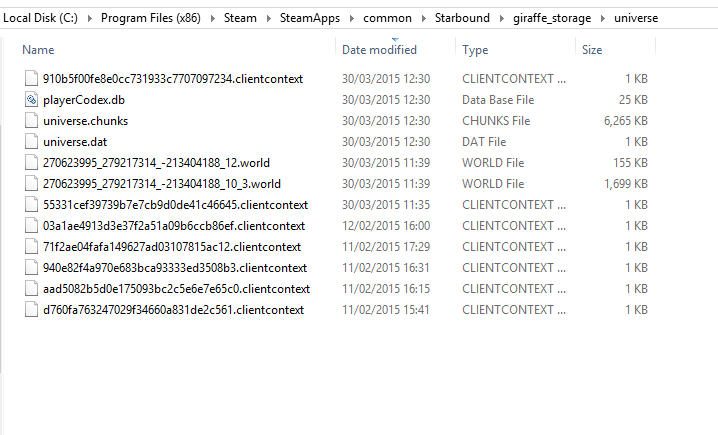
  • Find your universe folder. Typically, it should be located in SteamLibrary\SteamApps\common\Starbound\giraffe_storage\universe.

Screenshot 2015-04-23 11.24.57

  • Right click -> sort files by date last modified. If your planet’s been heavily customized/built upon, it should be one of the larger files. If you visit it frequently, it should also be one of the most recent.
  • “What do all these numbers mean?!” World files with names like: 270623995_279217314_-213404188_12.world mean that you’ve visited a planet with the coordinates X -270623995 Y -279217314.

coordinates_hooray

  • Put the coordinates into your ship’s computer and… hopefully, voila! Planet located! If not, try some of the other planets in your universe folder.
  • Now that you’ve found your home planet, don’t forget to create a bookmark. :)

I hope this proves helpful! We’ll be posting our daily progress update later, as usual. See you then! <3