
Archive: Patch Notes

Hey there, everyone! We’ve been reading your feedback from last week’s stable update, and it seems like most people are really enjoying the new features. We’ve also seen reports of several minor bugs, so we’ve pushed out a new update which should address most of these. Thanks to everyone who’s given us specific and detailed bug reports; it’s a huge help!

Fixes in this update:

  • Fixed a bug causing clients to be stuck in teleport cinematic if they disconnected from a server while it was playing
  • Fixed a bug that could prevent players’ ships from loading after a failed warp
  • Fixed missing outpost quest NPC, the arcade game quest is now completable again
  • Fixed a bug causing ship doors to be removed on upgrades
  • Fixed a bug locking players out of the end of the Erchius Mining Facility mission if they died after defeating the boss
  • Fixed a bug preventing the lever puzzle in the Floran Party mission from being completed
  • Fixed damage areas on ceiling and floor spikes
  • Fixed custom signs being set to ‘on’ after saving and loading
  • Fixed a bug causing the game to crash when entering a bad host name in the server join dialog
  • Fixed a rare bug in world generation which could prevent terrain from generating
  • Increased NPC energy regen
  • Greatly reduced server->client bandwidth for updating player ships
  • Made additional changes to further improve server stability
  • Included dump_versioned_json and make_versioned_json utilities for reading and writing various save data formats
  • Added a /suicide command for characters who are irreversibly stuck

Hopefully these fixes will be helpful to those of you experiencing issues. Let us know in the comments if you find anything new. Enjoy!
April 2nd – [UNSTABLE] Update Notes

It’s been a busy month and a half since our last stable update, and now it’s time for the unstable branch to be updated in preparation for the next! Before I get to the actual patch notes, please read this big red warning text:

As of this patch, the ‘Home’ planet feature has been replaced by planet bookmarks and direct teleporters. EXISTING CHARACTERS WILL LOSE THEIR HOME PLANETS!!! Make sure to write down your home planet’s coordinates or leave your ship in orbit so that you don’t lose track of its location.

Now, on to the good stuff!


betterbookmarksnewfeature_planetbookmarks

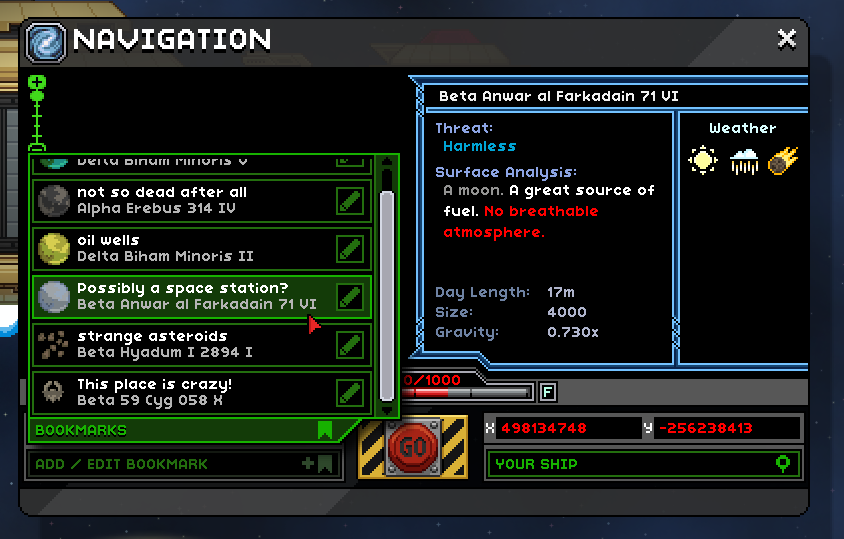
  • Players can now save planet locations in the cockpit navigation interface
  • Select a planet, then select ‘Add Bookmark’ to bookmark it
  • Select a bookmarked planet from the list to set it as your navigation target

alltheteleportersnewfeature_teleporters

  • Players can now place and register teleporters on planets
  • Interact with a teleporter to add it to your list of registered destinations, which you can return to from any other teleporter
  • Can also be used to teleport directly to party members
  • Find Teleporter Cores in the world
  • New Outpost store, the 2-Stop Teleshop, lets you use a Teleporter Core to create various types of teleporters to suit your style
  • Breaking a teleporter destroys it, but refunds the Teleporter Core
  • Outpost store includes a teleporter you can register for easy access to the outpost

teleportation_cinematicchangesreturningtoworlds

  • After logging out, players will be returned to the place in the world where they left (rather than back on the ship)
  • Mission dungeons will persist for 10 minutes after all players have left, allowing continuation of a mission after dying
  • Mission dungeons now have teleporters at the entrance and exit, should help clarify how and when to leave
  • Players can no longer be attacked while teleporting
  • Players can no longer initiate another teleport while teleporting
  • Teleport cinematic while destination world is loading

pig

shippets

  • All player ships should now be inhabited by a non-combat pet corresponding to the character’s race, in one of a wide variety of color options
  • Pets will investigate held items and various ship objects
  • Pets can be fed and will develop preferences for certain foods
  • Terramart now sells several pet-related items
    • Food Bowl to keep your pet fed while you’re busy adventuring
    • Pet Ball for your pets to play with
    • Pet House for your pets to sleep in adorably

thearknewlocation_ark

  • Ancient Gates now have another destination, a huge and ancient ruin
  • Gives a few clues about Starbound’s overarching plot… so mysterious!

changes_pathfinding

  • NPCs and ground monsters now jump accurately and reliably find paths across complex terrain
  • NPCs and ground monsters are much better at avoiding and escaping liquids
  • NPCs and ground monsters should become stuck MUCH less often

slimecave_2newbiome_slimecaves

  • Can be found underground on Radioactive worlds
  • Includes various unique items and a new furniture set

miscellaneous

  • Reworked Apex, Avian, Floran, Glitch and Hylotl name generators to be much less (but still a little bit) silly.
  • Changes to melee weapon responsiveness, damage sounds and visual feedback. Lots more of this coming in a future update!
  • Ranged weapons now have varying accuracy depending on the weapon type, quality and rate of fire
  • Player energy now refills much more rapidly and has a shorter delay before regenerating
  • Various improvements to server architecture which should greatly improve server performance and stability
  • Various improvements to internal handling of Lua API calls which should greatly reduce CPU usage, particularly in areas with many monsters or NPCs
  • Many small improvements and fixes to objects throughout the game, including updating 3d printing costs in preparation for future additions to the game’s economy
  • Scroll bars can now be clicked and dragged properly
  • Fixed several bugs with codexes. Codexes are now retained across universes. Existing players will, unfortunately, have their codexes reset.
  • Moons are now generated with solid cores to help avoid falling out the bottom
  • Several improvements to grass placement, also add underground ceiling grasses to several biomes
  • Fix bug where music volume changed in combat
  • Several small improvements to AI interface
  • Removed the annoying levitation status from random status pods
  • Added optimizations and cyrillic character fixes for Hobo font. Thanks to user dsp2003 for this fix!


Existing characters and universes are safe (aside from the codexes and home planet, as listed above). However, a few of these changes may require a new universe or new planets to take effect. Hope you all enjoy the changes, and for those of you playing on the Unstable branch, let us know if you find any bugs or have other feedback!

February 17 – Server Configuration Changes

As many of you have already noticed, the changes from our February 12 unstable update have now been pushed to stable. We made a couple of changes to the way that servers configure user accounts, and since several users have asked about it, here’s a brief explanation.

Your server’s starbound.config file should now have an empty serverUsers entry. This is where you will add player and administrator accounts. Here’s an example configuration:

  "serverUsers" : {
    "fred" : {
      "admin" : true,
      "password" : "hunter2"
    },
    "george" : {
      "admin" : false,
      "password" : "swordfish"
    }
  },
  "allowAnonymousConnections" : false,
  "allowAdminCommands" : true,
  "allowAdminCommandsFromAnyone" : false,
  "bannedIPs" : [  ],
  "bannedUuids" : [  ],

Note that both admin and non-admin user accounts are configured here, and all of these accounts require a user name (entered on the join server dialog in game). Multiple users can log into the same account, so if you want a simple server password, you can create an account named e.g. ‘guest’ with the shared non-admin password.

In order to enforce login for all users, you’ll also need to set allowAnonymousConnections to false in your server’s starbound.config. If allowAnonymousConnections is true (as it is by default) then any user can connect to the server without providing a user name or password. Admins will, of course, still need to log in if those privileges are restricted by the allowAdminCommandsFromAnyone setting.

We’ve also fixed the banlist functionality, so users can be banned by UUID or by IP. If you want to unban a user who has been permanently banned, you’ll need to manually remove them from the listing in the file and restart the server (for now).

Hope this clears up some confusion about the new system!